


At Stripe OLT, we’ve seen a massive increase in organisations that are starting to implement basic best practice policies and procedures. For many, setting up easy and immediate solutions, like password managers and switching on Multi-Factor Authentication, in place of single sign-on on has been the first place to start.
Multi-Factor Authentication (MFA) is an effective and well-known security best practice which both businesses and individuals should already be utilising. This essentially refers to a method of security in which a device requires more than one form of verification before granting access, rather than relying on an easily compromised static password. In fact, based on Microsoft research, enabling MFA to your device results in your account being 99.9% less likely to be breached.
However, for those who have recently taken the first step and switched on MFA, it’s worth noting the recent warning from Alex Weinert, Microsoft’s Director of Identity Security, and an access management expert. His recent announcement has urged users to avoid phone-based MFA solutions, stating that “SMS and call-based MFA are the least secure of the MFA methods available today”, for a variety of reasons:
Examples of telephone-based MFA solutions can include one-time passcodes (OTP) sent by SMS or received via voice calls, and whilst this added layer of security is preferable over nothing, it is the insecure and unprotected telephone networks that are the problem, not the MFA solution.

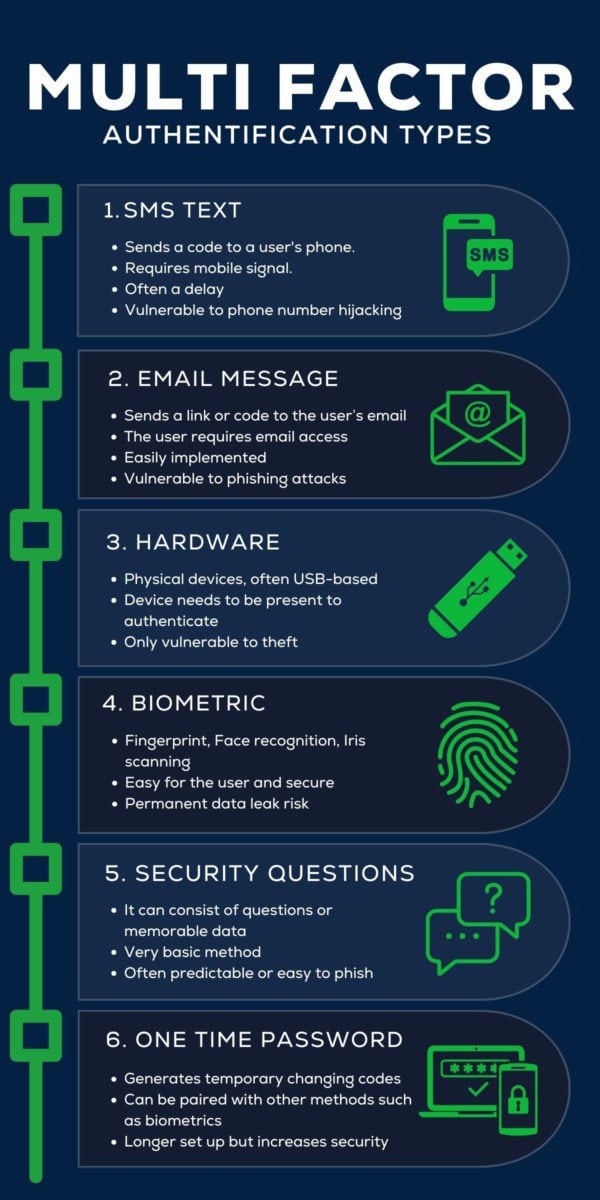
A password is usually the primary method of authentication, and combining that with some of the methods below can create multi-factor authentication.
SMS is one of the older multi-factor authentication methods. It requires a token (usually numbers and/or letters) to be sent via SMS text messaging to a user’s phone. The code can then be entered as an extra layer of authentication. This method requires that someone have a mobile signal, and they have to wait to receive the message. Over time, this method has become less secure as cybercriminals have devised methods to hijack phone numbers to access the SMS Message Tokens.
Similar to the SMS method, Email message tokens require a user to enter a token that is sent to their email; sometimes this may even be a clickable link. While email tokens create an extra layer over solely a password, and make it easier when deploying MFA, it still have its flaws. Email accounts themselves can be insecure if a user does not maintain good cyber security hygiene, and cybercriminals may even use phishing methods to get a user to reveal a code.
This authentication requires the user to carry a piece of hardware, often USB-based, that works as authentication. When prompted, the user presents the device to authenticate by plugging it in or tapping, for example. This is one of the more secure methods. Without the hardware device, it’s very difficult for cybercriminals to find a way around this.
Biometric Authentication has improved dramatically in recent times. The most common is a fingerprint, which is now commonplace on most smartphones. Additionally, newer methods of biometric authentication include face recognition and iris scanners. While being a secure access method, if this biometric data is leaked, then a user will be unable to change it, and the method becomes insecure.
This is probably the oldest method of multi-factor authentication. It requires a user to enter additional information that others may not know. This information could be in the form of an answer to a question, such as the often joked about ‘what is your mother’s maiden name?’ or in providing unique identifiers such as a ‘customer ID’. Often, the answers and information required are easy for cybercriminals to find out, making this a method only slightly more secure than a password.
Timed one-time passwords are a secure method of multi-factor authentication. A mobile app or password manager will provide a secure code that a user must enter to authenticate. This code will change after a short period of time, making it very difficult for cybercriminals to obtain. Some one-time password apps will require additional authentication processes, such as biometrics, adding even more layers.
Due to practicality, SMS and voice protocols cannot be encrypted, essentially because it would prevent users from being able to read them. Therefore, hackers are easily able to intercept these messages. They use techniques, like installing a software-defined radio or utilising an SS7 intercept service, to spy on phone traffic and intercept messages.
Hackers often target employees at phone networks, manipulating them into call forwarding or SIM swapping – essentially resulting in the hacker receiving the OTP or calls on behalf of the user.
Downtime is not unusual for phone networks, due to the changing regulations and general unreliability – this therefore affects the overall performance of MFA solutions, as users may not be able to access the messages when needed.
Essentially, SMS and voice-based MFA solutions appear dated and unreliable when compared to the rising sophistication of cyber crime in today’s digital landscape. The widespread adoption of MFA mechanisms has prompted attackers to evolve, and thus, attempts to breach MFA authentications are becoming more common, with phone-based solutions having the highest likelihood for success.
A good starting point for a reliable MFA solution is Microsoft’s Authenticator MFA app – it’s free to download on your mobile device and provides a dependable level of security on top of your password.
In addition, the Authenticator uses encrypted communication alongside other security measures, such as hidden notifications, an app lock, and sign-in history. Some highlights from Microsoft’s Authenticator include:
Using the Authenticator app, users can sign in to their personal accounts using biometrics such as facial recognition or a fingerprint instead of a static password.
You can set your device to still require a password in addition to your fingerprint, PIN or facial recognition in order to add further security.
The Authenticator app still supports time-based, one-time passwords, allowing you to add and safeguard additional accounts to the app.
Ultimately, a phone-based MFA is better than no MFA at all – whichever method you opt to have, it is essential to use at least one MFA solution – after all, accounts using this have a compromise rate of less than 0.1% across the population.
However, in utilising an app-based authenticator, rather than a phone-based solution, you benefit from additional layers of security, whilst alleviating the risks associated with phone networks and providers.
For more information on how you can protect your workforce and remote data, why not get in touch with one of our experts?