


Want to know what characteristics to look out for in a phishing e-mail? Our handy guide is here to help.
For those of you who might be unclear about the definition, it is a form of fraud in which an attacker impersonates a reputable person or company, usually through a scam e-mail or another form of communication. This can be done in a variety of ways, some of which include distributing malicious links or gaining user credentials and account information – hence the name phishing. Phishing is popular with cyber criminals as it relies heavily on human error, something much easier to crack than computer code.
Fraudulent phishing emails are consistently the most common form of cybercrime, but despite the apparent growth in awareness about the method, people are still frequently falling victim. In fact, according to Verizon’s 2023 Data Breach Investigations Report, 82% of data breaches involve a human element… Unfortunately, these phishing attacks do not appear to be slowing down as cyber-criminals continue to take advantage of global events and prey on real-world concerns in order to cause a higher interaction and click-through rate.
In an attempt to raise further awareness about online threats such as phishing and to provide insight into what you and your employees should be looking out for, we thought we would take you through a real example of a phishing email received and spotted by one of our staff…
This phishing email was a particularly good fake; however, there are still red flags that give away its lack of authenticity. Take a look at the fake email below, and we’ll explain why…
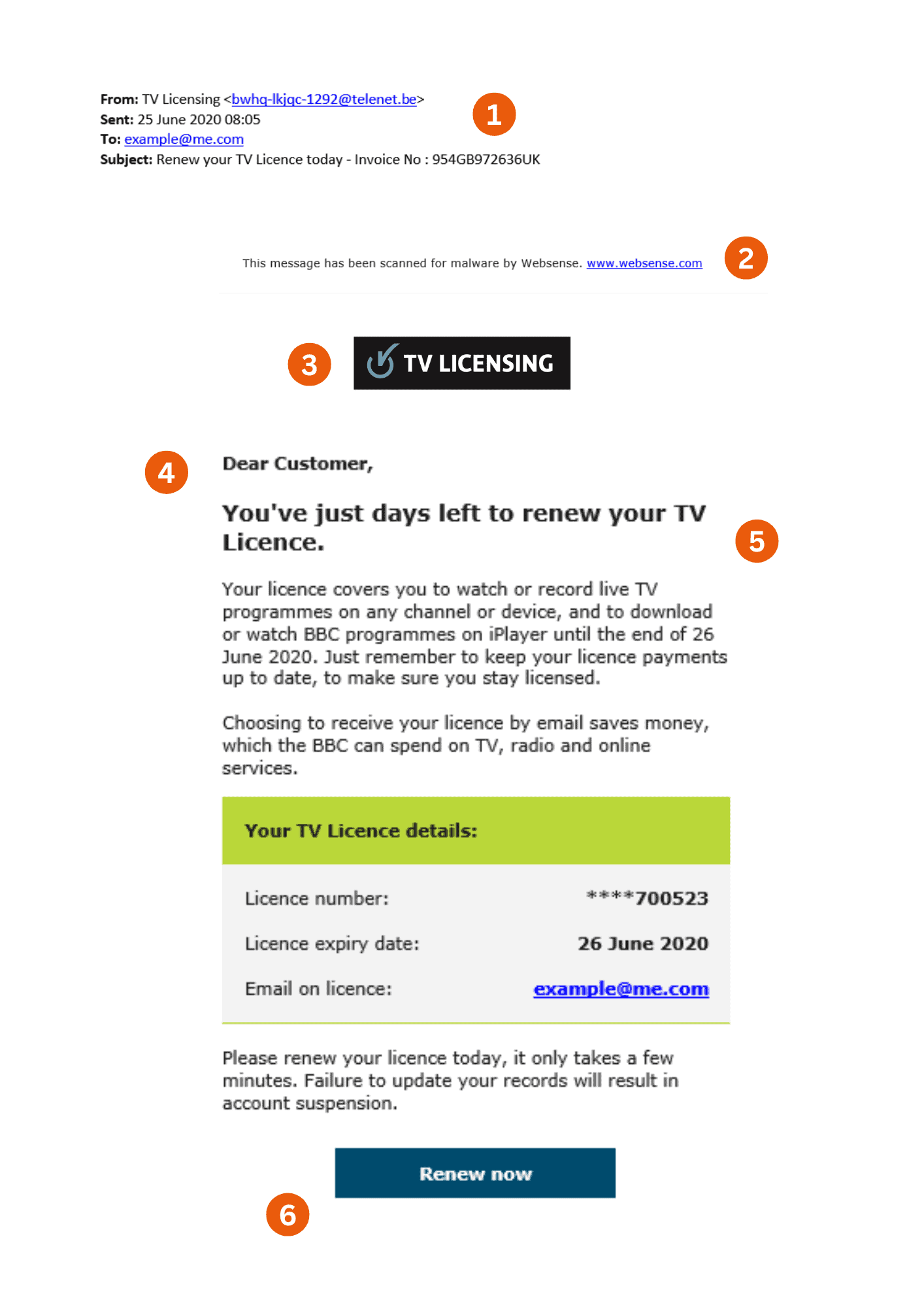
Always check the sender. This sender address does not appear to mimic a legitimate TV licensing email address. Always make sure you check the actual email address rather than just the sender name; an email from a public email system (such as an email domain like Gmail) is a red flag. – If the sender’s address is still unfamiliar to you, always take a few extra minutes to examine the content of the email.
Do not be fooled by a ‘Protected’ or ‘Scanned for Malware’ message trying to lull you into a false sense of security… Is the web address correct?
Similarly, do not be fooled by official-looking logos and images. Many cyber-criminals will use ‘scraped’ logos from a company in order to make their emails look legitimate.
Notice how this scam email is addressed to the ‘Customer’ rather than including any personal information or details. Likely because it is part of a generic email campaign sent to thousands of recipients… However, it is important to remember that using your name does not equal legitimacy – rather, it’s more likely to be part of a spear phishing campaign sent to targeted individuals.
Poor spelling, grammatical errors and low-quality graphics are often a key giveaway that you have received a phishing email… This example is nearly flawless; however, in the larger bodies of text, you can spot unprofessional and informal use of language that would be unlikely to be included in an official email. With the advancements of AI, these mistakes will become harder to find and spot.
Finally, do not click on any of the links included in a suspicious email. Notice how this email is littered with links for you to click, such as ‘Sign in’, ‘Renew now’ and links to apparent social media pages? If clicked, these may take you to a criminal or malicious website… If you’re in doubt, you can hover your mouse over the hyperlink to see the full URL.
One area phishing scams often prey on is a person’s decreased judgment skills when under pressure. Phishing scammers will often add a time-sensitive element, such as urgently paying an invoice or only having days left to renew your TV license, as in the above example.
It’s always important to do all the phishing checks before you open an attachment. As well as attempting to gain your details, attachments often can carry malware, a type of cyber attack. Phishing scammers will often combine the above sense of urgency with an attachment to try and get you to click it without first thinking about its legitimacy.
Extra Tip 3: Sensitive Information
Most companies won’t directly request sensitive information within an email, and will only raise important issues they may have with you. Details of requests for information, such as credit card details, phone numbers or two-factor verification text message codes, should be warning signs. Protect yourself from this by only contacting the company via known methods, such as their public email and phone numbers and verifying their request. Never reply, click links or call phone numbers within the email.
Cyber criminals only require one error from an employee for their operation to be successful… Therefore, it is integral to educate everyone in your organisation. Unfortunately, spam e-mail filters can never be guaranteed to be 100% effective, hence educating employees to understand and to recognise phishing campaigns is crucial.
Here at Stripe OLT, we additionally provide prevention through education. Our Cyber Security Education training days focus on specific areas of business risk and how to mitigate these appropriately. Our two types of training – Staff Cyber Awareness (SCA) and Executive Cyber Fundamentals (ECF) both include training on phishing campaigns, in order to provide your people with the information they need to become your business’s first line of cyber-defence. Get in touch to talk to one of our cyber security experts for more information on our tailored training days.
Remember, if you do receive an email that you are unsure about, you can always report it to the National Cyber Security Centre’s Suspicious Email Reporting Service by forwarding the email to report@phishing.gov.uk.